
dictid

Features

Every platform. Your AI. 28 templates.

Capture bot-free desktop calls or in-person rooms, transcribe 100% on-device across 34+ languages, and own every transcript with zero per-minute fees.

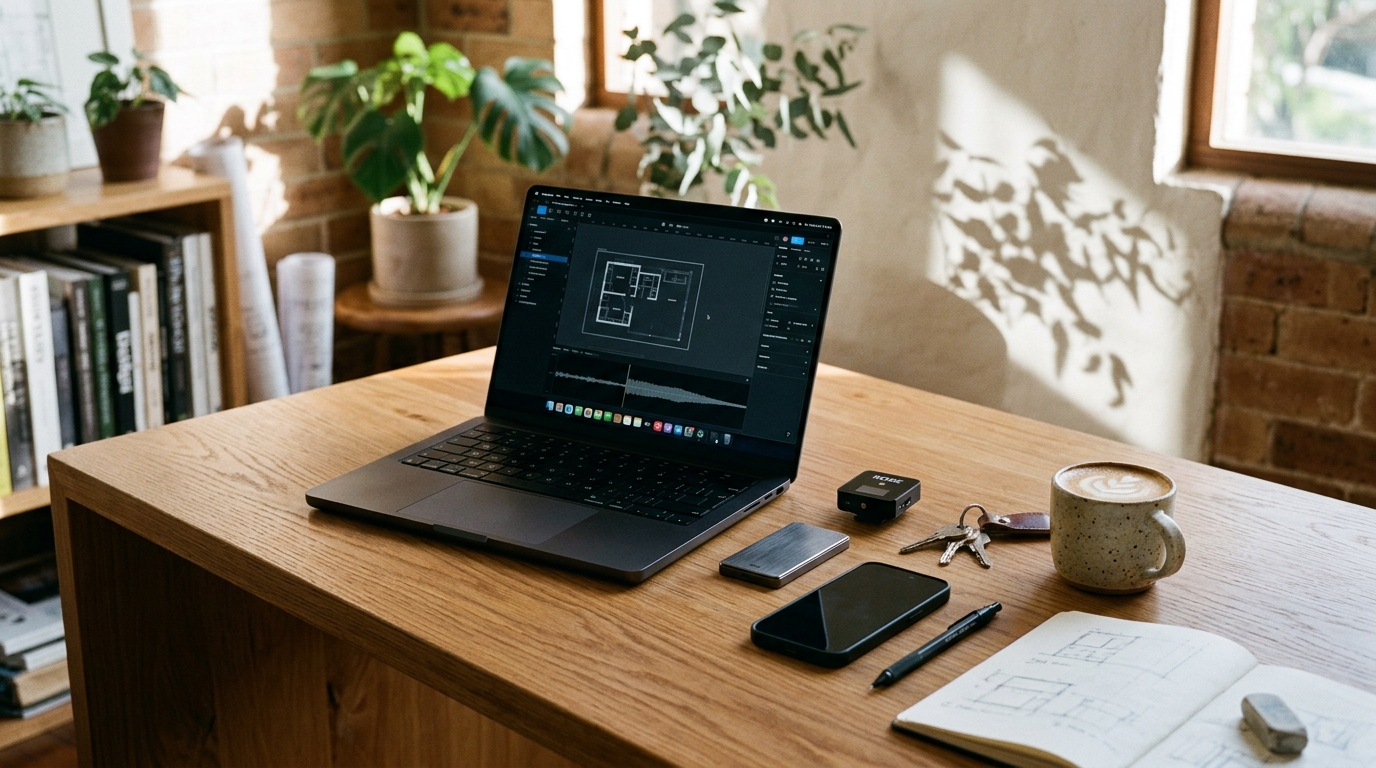
Space-black MacBook Pro on a warm walnut desk flanked by a matte-black smartphone, brushed titanium Pocket AI recorder card, and wireless microphone receiver

Platform & capture freedom

iOS, Android, bot-free macOS desktop, wireless mics, or generic Pocket cards. Zero hardware lock-in.

Bot-free macOS desktop
Uses Apple ScreenCaptureKit to capture Zoom, Microsoft Teams, and Google Meet system audio alongside your mic without a bot joining the call.
iOS & Android capture
Record lossless 16 kHz mono WAV straight to disk in one tap, even in airplane mode.
DJI Mic, RØDE & USB-C
Plug in a DJI wireless receiver, RØDE mic, or any USB-C or Bluetooth input your device can see.
Generic AliExpress Pocket cards
Pairs over Bluetooth, pulls recordings via Wi-Fi Direct, and restores your phone's network automatically.

On-device intelligence & privacy

Local Whisper transcription, speaker diarisation, and compliance controls with zero cloud ASR bytes.

Local Whisper & SpeakerKit
SHA-256 verified models run on-device across 34+ languages with 166 ms speaker diarisation, even in airplane mode.
Pre-record consent & audio expiry
Display a pre-record consent notice, set automatic audio-only retention expiry (7, 30, or 90 days), and keep zero server-side voiceprints.
BYOK or Managed AI
Bring your own Claude, Gemini, or OpenAI key in your device keychain, or use optional monthly Managed AI credits.
Cross-meeting Q&A
Ask questions across your entire meeting library with local retrieval and exact transcript citations.

Dispatch, export & archive

Turn conversations into confirmed outcomes across teams and clients.

Microsoft Teams Adaptive Cards
Posts a structured Adaptive Card straight to your channel with confirmed HTTP delivery.
Calendar, Reminders & 5+ exports
Matches recordings to calendar events, pushes action items to Apple Reminders, and exports WAV, PDF, Markdown, JSON, or plain text.
Encrypted R2 Archive
Optional AU$9/mo cloud archive with end-to-end sync across devices, or keep everything local forever.

App tour

Every screen and what it does

Built with native SwiftUI on iOS and macOS and native Kotlin on Android: every tab, sheet, and hardware workflow is designed for instant offline capture and structured output.

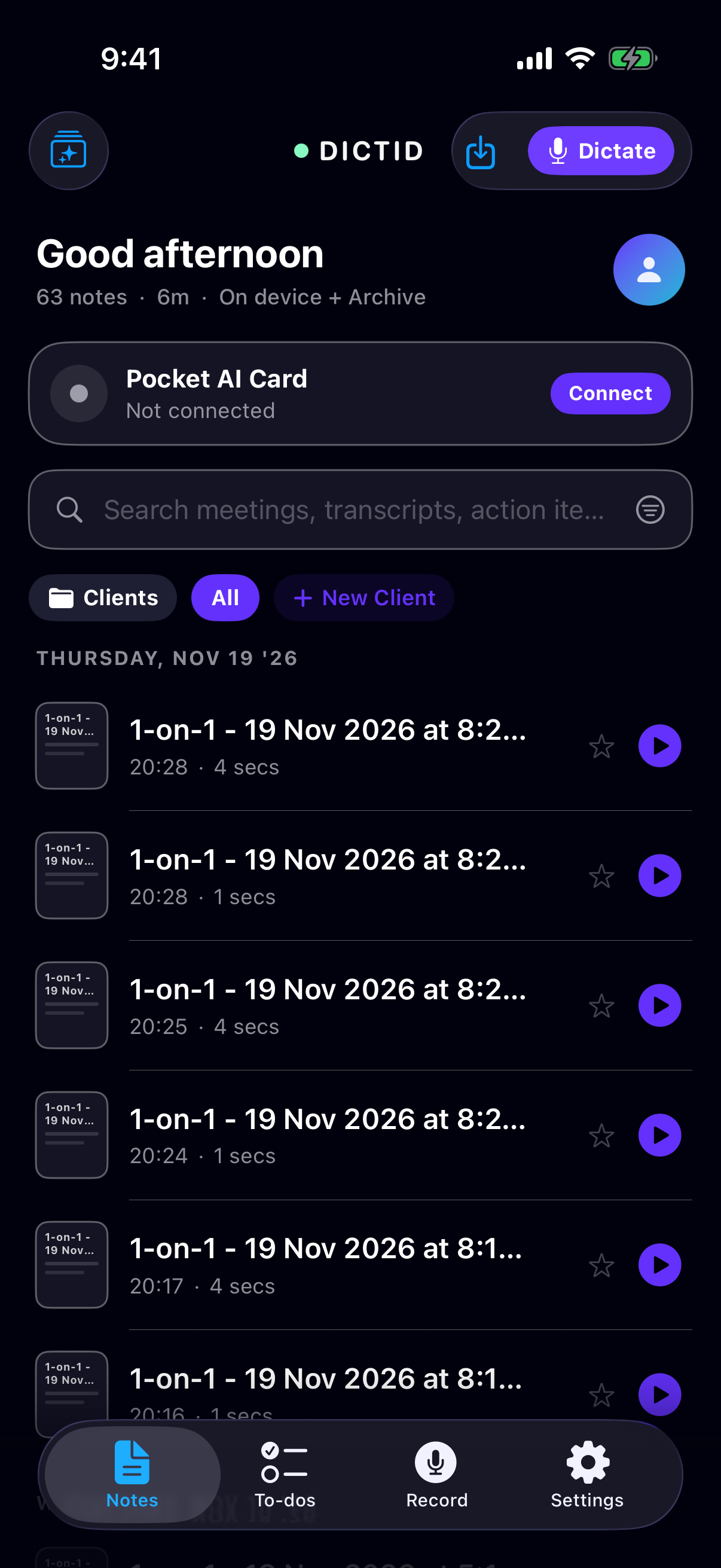
Live screen grab of the dictid app showing Pocket AI Card connection, Dictate button, and on-device meeting notes

Live iOS Notes feed showing Pocket AI Card sync, Dictate button, and on-device transcripts.

01iOS · Android · macOS

Notes feed & quick dictate

Browse every meeting in chronological order, search full transcripts, filter by client folder, see calendar-matched titles, or tap Dictate for instant voice-to-text.

02iOS · Android · macOS ScreenCaptureKit

Record & studio capture

One-tap capture from your phone mic, DJI/RØDE wireless receiver, USB-C mic, Pocket AI card (BLE + Wi-Fi Direct), or bot-free macOS system audio (Zoom, Teams, Google Meet) with live waveform and pre-record consent notice.

0316 kHz WAV · 28 templates · Export Hub

Meeting detail, diarisation & brief

Scrub the lossless WAV waveform, inspect word-level SpeakerKit diarisation, rename or merge speakers across your whole library, run any of 28 templates (or Custom Builder), post to Microsoft Teams, and export WAV, PDF, Markdown, JSON, or WebVTT.

04Local retrieval + citations

Ask across all meetings

Query decisions, commitments, budgets, or technical trade-offs across your entire recording library using local retrieval with exact transcript citations.

05Apple Reminders · Calendar

To-dos & calendar matching

Review every action item extracted across meetings with owners and due dates, match recordings to calendar events, and push tasks straight to Apple Reminders.

06BLE + Wi-Fi Direct · Radar

Pocket card & Find My Device

Pair generic AliExpress Pocket AI cards, pull recordings over Wi-Fi Direct with automatic network restore, enable auto-delete after transfer, track last-known location on a map & live radar, or unbind and release the card.

Complete configuration

Every setting explained

Full transparency over speech models, retention rules, Keychain BYOK keys, Teams webhooks, and Pocket AI card hardware behaviour.

Speech & Transcription

  • Spoken Language (34+)Choose the language being spoken so local Whisper transcribes accurately, independent of your summary language.
  • Summary LanguageSet the written English variety or output language (`en-AU`, `en-US`, `en-GB`, `en-NZ`) used for briefs and titles.
  • Transcription QualitySwitch between Fast and Accurate Core ML Whisper weights (SHA-256 verified, downloaded once on-device).
  • Transcription EngineRun Automatic, On-Device Whisper, or Apple Speech fallback depending on your hardware and offline needs.
  • Speaker DiarisationToggle local SpeakerKit speaker separation (`166 ms`, zero server-side biometric voiceprints stored).
  • Custom Word DictionaryAdd client names, acronyms, and domain jargon (e.g. `WhisperKit`, `Cloudflare R2`) to guide transcription and AI summaries.

Privacy, Consent & Retention

  • Pre-Record Consent NoticeDisplay an on-screen recording consent reminder before capture starts in client or regulated rooms.
  • Audio Retention ExpiryKeep raw WAV audio forever or auto-purge audio-only files after `7`, `30`, or `90` days while keeping transcripts and briefs.
  • Zero VoiceprintsSpeaker labels are derived from conversation and calendar context only; biometric voiceprints are never saved.

AI & Summaries

  • Default Summary TemplatePick your default structure from 28 built-in templates (`Meeting`, `Legal Consultation`, `SOAP Notes`, `Punch List`, `Tech Review`) or Custom Builder.
  • Auto-SummariseAutomatically generate your structured brief as soon as on-device transcription finishes.
  • BYOK AI Keys (Keychain)Store your own Claude, Gemini, or OpenAI API key in your device Keychain, sent directly to your provider only when you request a summary.
  • Managed AI CreditsOptional monthly credits on Archive, Pro, and Team plans when you want zero API-key setup.

Integrations, Hardware & Storage

  • Microsoft Teams WebhookConfigure your Teams channel webhook and toggle automatic Adaptive Card dispatch with confirmed HTTP delivery.
  • Custom WebhookSend structured JSON payloads to n8n, Zapier, Slack, or your own internal endpoint.
  • Calendar MatchingMatch new recordings to calendar events to pre-fill meeting titles and attendee speaker labels.
  • Pocket Card ControlsSet a custom card nickname, toggle `Delete After Transfer`, mark lost with contact info, view `Find My Device` radar, or unbind the card.
  • Encrypted Archive & R2Sync across devices via your `dictid` account (Archive/Pro/Team) or connect your own Cloudflare R2 bucket credentials directly.

Who it's built for

Four rooms. Zero compromise.

Every workflow on dictid is engineered around the real constraints of your room: client trust, zero cloud ASR, noisy job sites, or bot-free engineering reviews.

Three colleagues having a laptop-free discussion around an oak table with an iPhone and slim magnetic recorder card

01 · Executives & Consultants

Stay present in the boardroom without a bot or a laptop wall.

Discreet in-person + bot-free Mac capture, cross-meeting Q&A, and instant Microsoft Teams dispatch.

Meeting · Boardroom · 1-on-1 · Client Discovery · Sales Call

Senior lawyer or clinician sitting across a warm walnut table from a client with a matte-black phone and recorder card

02 · Legal, Medical & Regulated

Keep privileged client and patient audio 100% off third-party clouds.

Airplane-mode Whisper transcription, pre-record consent notice, auto audio-only expiry (7/30/90 days), and BYOK.

Legal Consultation · SOAP Notes · Incident Report

Architect with a clip-on wireless microphone reviewing architectural plans on site with an iPhone

03 · Field, Site & Construction

Turn noisy site walks into structured defect tables, even with zero signal.

Offline-first capture with DJI or RØDE wireless mics or a Pocket card, exported straight to PDF or Markdown.

Punch List · Quick Memo · Incident Report

Two software engineers leaning over a sunlit oak studio workbench beside a MacBook Pro, smartphone, and recorder card

04 · Software & Product Teams

Never lose an architecture decision or acceptance criterion between calls.

Bot-free macOS Zoom, Teams, and Meet capture via ScreenCaptureKit, plus Teams Adaptive Cards.

Tech Review · Software Development · Software & App Review · Project Standup

Built-in & Custom

All 28 summary templates

Every template extracts a suggested title, executive summary, key decisions, and assigned action items, plus you can build custom templates in Settings.

Meetings & Executive

  • Auto DetectAdaptive structure & scene detection
  • MeetingTopics, decisions, open questions
  • 1-on-1Themes, support asked for, follow-up
  • BoardroomMotions, risks noted, matters deferred
  • Project StandupCompleted, in progress, blockers

Calls & Interviews

  • Phone CallCall purpose, key agreements, next steps
  • Discussion CallDiscussion points, agreed approach, open items
  • Q&A CallQuestions asked, answers, clarifications
  • InterviewQuestions & answers, evidence given, concerns

Consulting & Sales

  • Client DiscoveryClient goals, scope, budget & timeline
  • Sales CallBuyer needs, objections, close plan
  • BANT AnalysisBudget, authority, need, timeline
  • Needs AssessmentRequirements, gap analysis, recommendations

IT & Engineering

  • IT Team MeetingTechnical discussions, updates, risks
  • Tech ReviewArchitecture decisions & implementation plan
  • Software DevelopmentRequirements, data model, acceptance criteria
  • Website DevelopmentPages, design & copy, integrations, launch
  • Software & App ReviewWorking flows, bugs, UX tweaks, fix plan

Legal, Medical & Site

  • Legal ConsultationFacts, legal risks, recommended next steps
  • Incident ReportTimeline, impact & root cause, corrective actions
  • SOAP NotesSubjective, objective, assessment & plan
  • Punch ListSite defects, repairs & trades, sign-off criteria

Notes & Education

  • Quick MemoNames, figures, addresses & dates
  • Daily Journal & IdeasCore ideas, reflections, priorities
  • Dictation NotesStructured bullet points & references
  • Reasoning ModeProblem framing, trade-offs, conclusion
  • Lecture / StudyCore concepts, examples, review questions
  • Teaching NotesLesson coverage, student feedback, next prep

Comparison

How dictid compares across the market

Benchmarked against meeting bots (Otter, Fireflies), bot-free desktop apps (Granola, Fathom), and proprietary hardware cards (Plaud, Pocket).

CapabilityMeeting BotsOtter, Fireflies, Read.aiBot-Free DesktopGranola, FathomHardware CardsPlaud, PocketdictidiOS, Android, macOS + any mic
Bot-free online callsNo (bot joins call)Yes (desktop only)No (phone/card only)Yes (macOS ScreenCaptureKit)
In-person & field capturePhone mic onlyNoProprietary card ($209 to $249+)Any mic, DJI/RØDE, or Pocket card
On-device transcriptionNo (cloud upload)No (cloud upload)No (cloud upload)100% on-device (offline capable)
Speaker diarisationCloudCloudCloud (paid tier)On-device (166 ms SpeakerKit)
Transcription feesPer-minute / seat tiersTiered limits300 min/mo free, then paid$0 unlimited forever
AI provider choiceVendor lockedVendor lockedVendor lockedBYOK (Claude, Gemini, OpenAI) or Managed
Cross-meeting Q&APaid tierYesLimitedYes (local retrieval + citations)
Consent & audio retentionPartialNoBasicPre-record consent + audio-only expiry

Ready to ditch bots and per-minute fees?

Start free on iOS, Android, or macOS with any mic or Pocket card you already own.